
Prompting the Shape Maker AI
Basic Modeler includes a handy built-in editor for using the Shape geometry operation, providing a graph paper-like interface for designing arbitrary shapes. This makes using the Shape command far easier than manually typing in a list of coordinates.
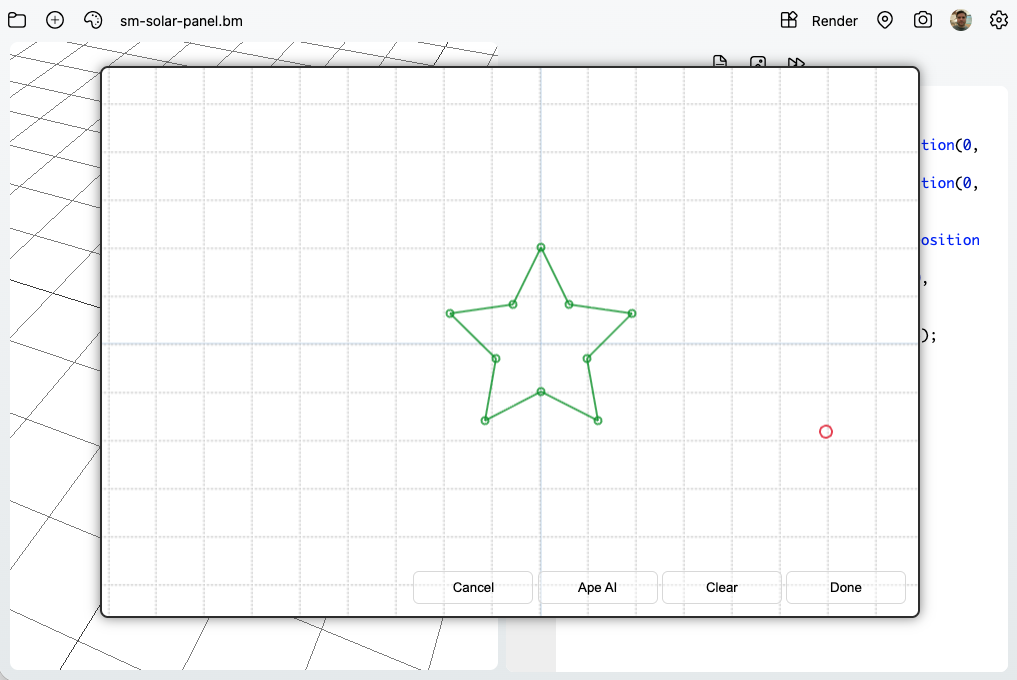
On supported devices though, Basic Modeler can take it a step further and utilize an on-device AI LLM (powered by Ape AI) in order to automatically generate some basic shapes for you. Now, try not to get overly excited, as the AI integration is still in it's early stages and results may vary. This article will demonstrate the current shape types that the AI generator understands, and will provide some example prompts you can use to get your desired output.
Supported Shapes and Sample Prompts
The AI maps natural language prompts to a shape type and parameters. Here are the different shapes currently supported by the Basic Modeler AI generator, along with a few sample prompts for each in order to get you started.
Rectangle
- create a rectangle
- rectangle width 8 and height 3
- make a wide rectangle 10 by 4
Triangle
- create a triangle
- triangle width 7 and height 5
- make a tall triangle height 9 width 4
Polygon
- create a pentagon
- create an octagon with a size of 6
- 7 sided polygon size 4
Star
- 5-pointed star
- star with seven sides, an outer radius of 4 and an inner radius of 2.5
- create a 9 point star outer radius 6 inner radius 3
Heart
- create a heart
- heart size 6
- small heart size 3
Arrow
- create an arrow
- arrow length 10 width 2 head width 4 head length 3
- short thick arrow
Rounded Rect
- rounded rectangle width 8 height 5 radius 1.5
- rounded square width 6 height 6 radius 1
- soft corner rectangle 10 by 4 radius 1
Capsule
- create a capsule
- capsule width 10 height 3
- vertical capsule width 3 height 10
Donut Slice
- create a donut slice
- donut slice outer radius 6 inner radius 3 start angle 20 end angle 140
- ring wedge from 300 to 45 degrees
Arc Stroke
- draw a thick arc
- arc stroke radius 5 start angle 30 end angle 165 thickness 1.2
- semi arc radius 8 thickness 2
Ellipse
- create an oval
- ellipse width 9 height 4
- flat oval width 12 height 3
Cross
- create a plus sign
- cross width 8 thickness 2
- thick cross width 6 thickness 3
Crescent
- create a moon shape
- crescent radius 5 thickness 1.5
- thin crescent radius 6 thickness 1
Cloud
- create a cloud
- cloud width 10 height 5
- small cloud width 6 height 3
Lightning
- create a lightning bolt
- lightning height 10 width 3 zigzags 4
- short lightning with 3 zigzags
Droplet
- create a water drop
- droplet size 5
- small teardrop size 2.5
Trapezoid
- create a trapezoid
- trapezoid top width 4 bottom width 8 height 5
- inverted trapezoid top 7 bottom 4 height 4
Parallelogram
- create a parallelogram
- parallelogram width 8 height 4 skew 2
- slanted box width 10 height 5 skew 3
L Shape
- create an L shape
- l shape width 6 height 9 thickness 2
- thick L width 5 height 7 thickness 3
T Shape
- create a T shape
- t shape width 8 height 8 thickness 2
- narrow stem T width 10 height 8 thickness 1.5
Chevron
- create a chevron
- chevron width 8 height 5 thickness 1.2 angle 70
- wide chevron angle 110 thickness 2
Shield
- create a shield
- shield width 6 height 8
- small shield width 4 height 5
House
- create a house shape
- house width 7 height 6 roof height 3
- tall house width 5 height 8 roof height 2.5
Gear
- create a gear
- gear with 12 teeth outer radius 6 inner radius 4 tooth height 1
- small gear teeth 8 outer radius 4 inner radius 2.8 tooth height 0.7
Flower
- create a flower
- flower with 8 petals petal length 5 center radius 1.5
- daisy style flower petals 12 petal length 4 center radius 1
Semicircle
- create a semicircle
- semicircle radius 6
- small half circle radius 3
Ring
- create a ring
- ring outer radius 6 inner radius 4
- thin ring outer 7 inner 6
Speech
- create a speech bubble
- speech bubble width 8 height 5 tail size 2
- small chat bubble width 5 height 3 tail size 1
Shape Generation in Basic Modeler using Ape AI is still in it's infancy, and so you may encounter issues. If you find problems or have suggestions on new type generations that should be added, please let me know in the official Ape Apps Discord channel!